



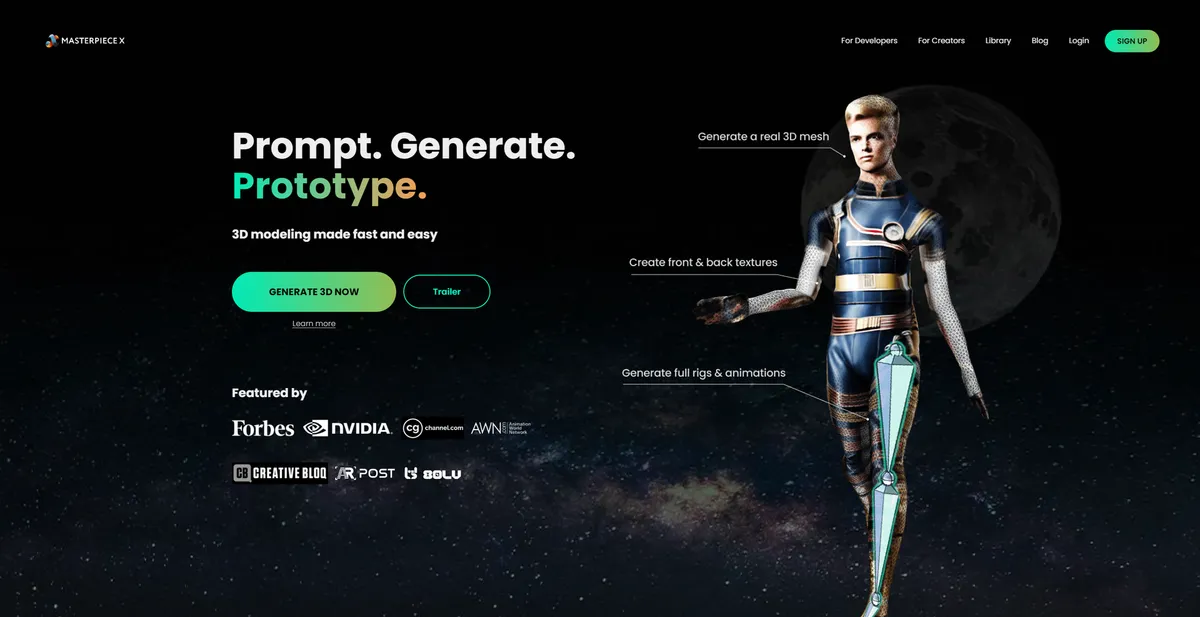
What is Masterpiece X?
An indie game developer needs a background character for a low-poly village scene. Instead of spending four hours modeling and rigging a basic humanoid in Blender, they type a prompt and download a fully rigged .GLB file (often under 5MB) five minutes later. The character imports directly into their game engine ready for animation.
Masterpiece Studio Inc. built Masterpiece X as a generative AI platform for 3D asset creation. The web-based tool translates text prompts or 2D images into textured 3D meshes. It targets solo developers and digital creators who lack manual sculpting skills but need custom assets for Unity or Unreal Engine. The platform handles the entire pipeline from initial geometry generation to final skeletal rigging.
- Primary Use Case: Generating and auto-rigging low-poly 3D characters for indie games.
- Ideal For: Solo game developers and VR/AR environment builders.
- Pricing: Starts at $10.99 (Subscription) — Provides 750 credits per month for asset generation.
Key Features and How Masterpiece X Works
AI Mesh Generation
- Text-to-3D: Generates complete 3D meshes from natural language prompts. Complex mechanical parts often fail.
- Image-to-3D: Reconstructs 3D models from uploaded 2D images using automated depth mapping. Limited to single-angle interpretations.
Automated Rigging and Texturing
- Auto-Rigging: Applies skeletal rigs to humanoid models. Non-humanoid creatures require manual bone placement elsewhere.
- PBR Texturing: Creates diffuse, normal, and roughness maps at up to 2K resolution. Textures appear blurry on complex geometry.
Export and Optimization
- Mesh Optimization: Includes built-in remeshing tools to reduce polygon counts. Capped at basic decimation algorithms.
- Export Formats: Downloads assets in .GLB, .FBX, and .OBJ formats. Restricted to these three industry standards.
Platform Access
- Web Editor: Provides in-browser tools for basic mesh manipulation. Lacks advanced vertex editing capabilities.
- Community Library: Grants access to a searchable database of user-generated 3D assets. Requires an active internet connection to browse.
Masterpiece X Pros and Cons
Pros
- Removes the steep learning curve of traditional 3D software like Blender for basic asset creation.
- Integrated rigging and skinning workflow reduces character setup time from hours to under five minutes.
- Browser-based processing allows 3D generation on low-powered laptops or mobile devices without local rendering hardware.
- Direct compatibility with Unity and Unreal Engine via standard FBX exports speeds up game development pipelines.
Cons
- Generated topology is messy and unsuitable for high-end cinematic close-ups without manual cleanup.
- AI struggles with complex mechanical parts or precise architectural dimensions compared to organic shapes.
- High credit cost per generation means users exhaust monthly limits during trial-and-error phases.
- Texture quality appears misaligned on complex geometries, requiring external touch-ups in Photoshop.
Who Should Use Masterpiece X?
- Indie Game Developers: Solo creators can populate background scenes with low-poly characters without hiring a dedicated 3D artist.
- VR/AR Prototypers: Developers building spatial environments can generate placeholder assets to test scale and interaction.
- Not for Cinematic Animators: The messy topology and 2K texture limits make these models unusable for high-fidelity film rendering.
Masterpiece X Pricing and Plans
The platform uses a freemium model based on a credit system.
Generating a standard model costs 50 credits. Refining the mesh or generating higher resolution textures consumes additional credits based on the specific processing requirements.
The Special Launch Offer provides 250 free credits (enough for five basic generations) for new accounts. This acts as a genuine free trial for testing the core features before committing to a paid plan.
The 750 Credits Subscription costs $10.99 per month. This tier suits hobbyists needing a few assets per week.
The 1500 Credits Subscription costs $19.99 per month. This plan targets active indie developers building complete game levels.
The 3000 Credits Subscription costs $36.99 per month. Small studios requiring bulk asset generation benefit most from this tier.
Users can buy a Pay As You Go pack of 750 credits for a one-time $15.00 fee. This option works well for creators with irregular project schedules.
How Masterpiece X Compares to Alternatives
Similar to Luma AI, Masterpiece X generates 3D models from text and images. Luma AI excels at photorealistic NeRF captures of real-world objects using smartphone video. Masterpiece X focuses on auto-rigging humanoid characters for immediate animation use in game engines.
Unlike Meshy, which offers detailed AI texturing for existing meshes, Masterpiece X provides an all-in-one generation pipeline. Meshy produces cleaner topology for hard-surface objects like weapons or vehicles.
Masterpiece X wins on speed for rigged organic characters.
Verdict for Solo Game Developers
Masterpiece X offers the fastest route from a text prompt to a fully rigged humanoid character in Unity. Cinematic artists needing clean topology should look at Meshy instead.